
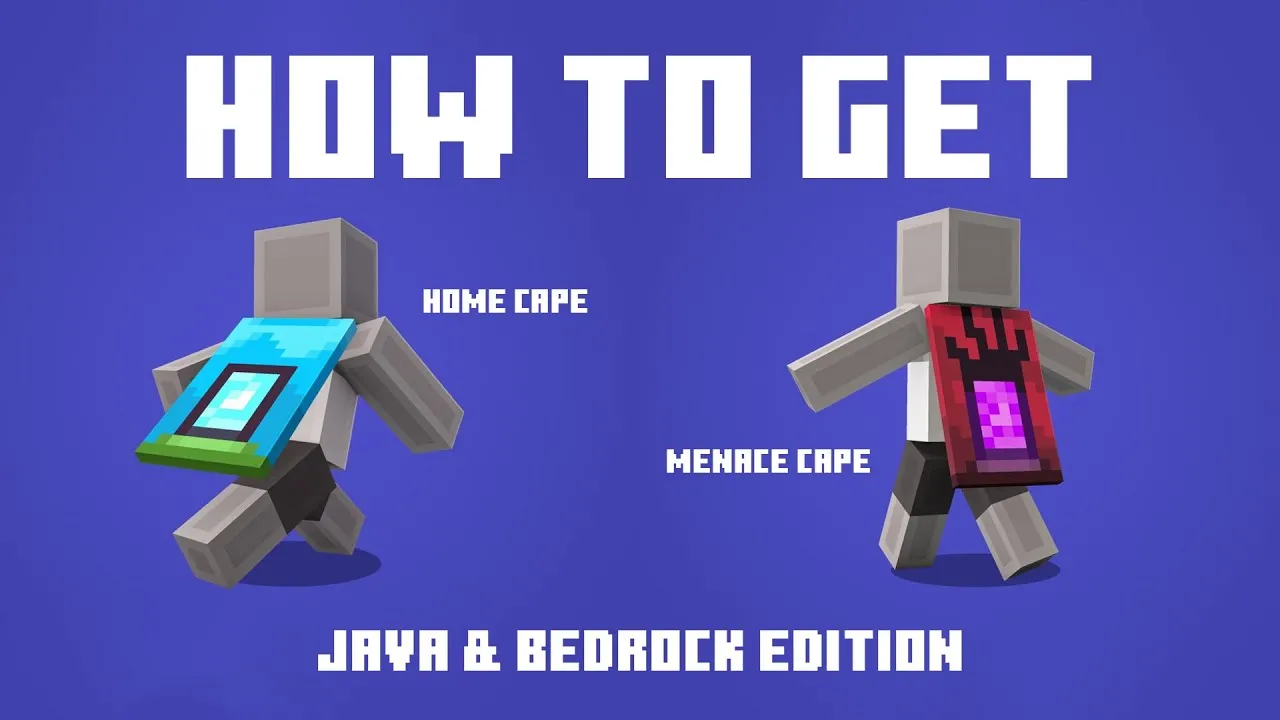
To celebrate the upcoming release of A Minecraft Movie on April 4, 2025, Mojang has introduced two exclusive in-game capes: the Home Cape and the Menace Cape. Here's how you can obtain them:
Home Cape
Description: Features a serene blue background with a distinctive portal design, symbolizing the gateway between the real world and the Minecraft universe as depicted in the movie.
How to Obtain:
- Sign in to Twitch: Log into your Twitch account. If you don't have one, create it at twitch.tv.
- Access Drops & Rewards: Click on your profile icon in the top-right corner and select "Drops & Rewards."
- Locate the Campaign: Under the "All Campaigns" tab, find the "Minecraft Movie Home Cape Campaign."
- Watch a Stream: Click on the linked "Minecraft" category to view live streams. Watch any Minecraft stream for at least 3 minutes.
- Redeem the Code: After 3 minutes, return to the "Drops & Rewards" section, copy the 25-character code provided.
- Activate the Cape: Visit the Minecraft Redemption Page, sign in with your Microsoft account, paste the code, and confirm to add the Home Cape to your account.
Availability: March 18 – April 6, 2025.
Menace Cape
Description: Showcases a red background with a unique Nether portal design, inspired by the portal through which piglins infiltrate the Overworld in the film.
How to Obtain:
- Open TikTok: Launch the TikTok app on your device and log in.
- Search for Minecraft Streams: Use the search function to find live Minecraft streams. Look for streams with the "Rewards Available" tag.
- Watch the Stream: Join a stream and watch for at least 3 minutes.
- Retrieve the Code: After 3 minutes, tap the TikTok icon in the top-left corner to access your 25-character redemption code.
- Activate the Cape: Visit the Minecraft Redemption Page, sign in with your Microsoft account, paste the code, and confirm to add the Menace Cape to your account.
Availability: March 18 – April 6, 2025.
Additional Notes
- Account Linking: Ensure your Twitch and TikTok accounts are linked to your Microsoft account used for Minecraft.
- Platform Compatibility: Initially, these capes are available in the Bedrock Edition's Dressing Room. They will become accessible in the Java Edition subsequently.
- Time Zones: Be mindful of time zone differences to ensure you redeem the capes before the deadline.
By following these steps, you can proudly wear the Home and Menace capes in Minecraft, showcasing your enthusiasm for the upcoming movie.

Sign in to join the conversation.
Sign in with Google